Ink Money
Online Tattoo Marketplace for Artist
services
Web & Mobile App Development
industry
Marketplace
duration
5 Months
country
Australia

Project Overview
Inkmoney provides a platform for the studios and users of Australia to make a tattoo. Different studios can register their studios along with their location in the Inkmoney. they can also upload their work done in past. Users can search for these studios and can book an appointment for a new tattoo. Users can also apply for finance to draw an tattoo. Inkmoney provides a flexible financial model with features such as same-day approvals, different pay cycles, financial plans with a variety of ranges, etc.
Our Challenges
Financial & Wallet Management
Inquiry & Quote Handling
Studio Discovery & Search
Loan Processing & Approvals
Our Solution
Wallet Management System
Smart Inquiry Workflow
Advanced Studio Marketplace
Automated Loan Management
Features Implemented
The real estate CRM software includes a comprehensive set of features designed for lead generation, contact management, and agent productivity.
1. Wallet
The wallet is the module where the users and studios can easily manage their current balance and find out the transactions summary. When a loan is approved, funds are credited to the applicant’s wallet. The wallet is an on-platform account against which transactions are made. Funds are deposited into the wallet when loans are approved and are withdrawn from the wallet when the user makes drawdowns or the funds expire.

2. Send InkMoney
Users can be sent their wallet balance to the studio with the Send InkMoney feature. Users will enter the amount, add the description and search the studio with a name or QR code and transfer the wallet money to the studio wallet account.

3. Withdraw Funds
Users and Studios will withdraw the wallet amount to the bank transfer with the withdrawn fund's module.They can enter the mandatory details and click on the transfer button for easy transfer.

4. Apply For More Funds
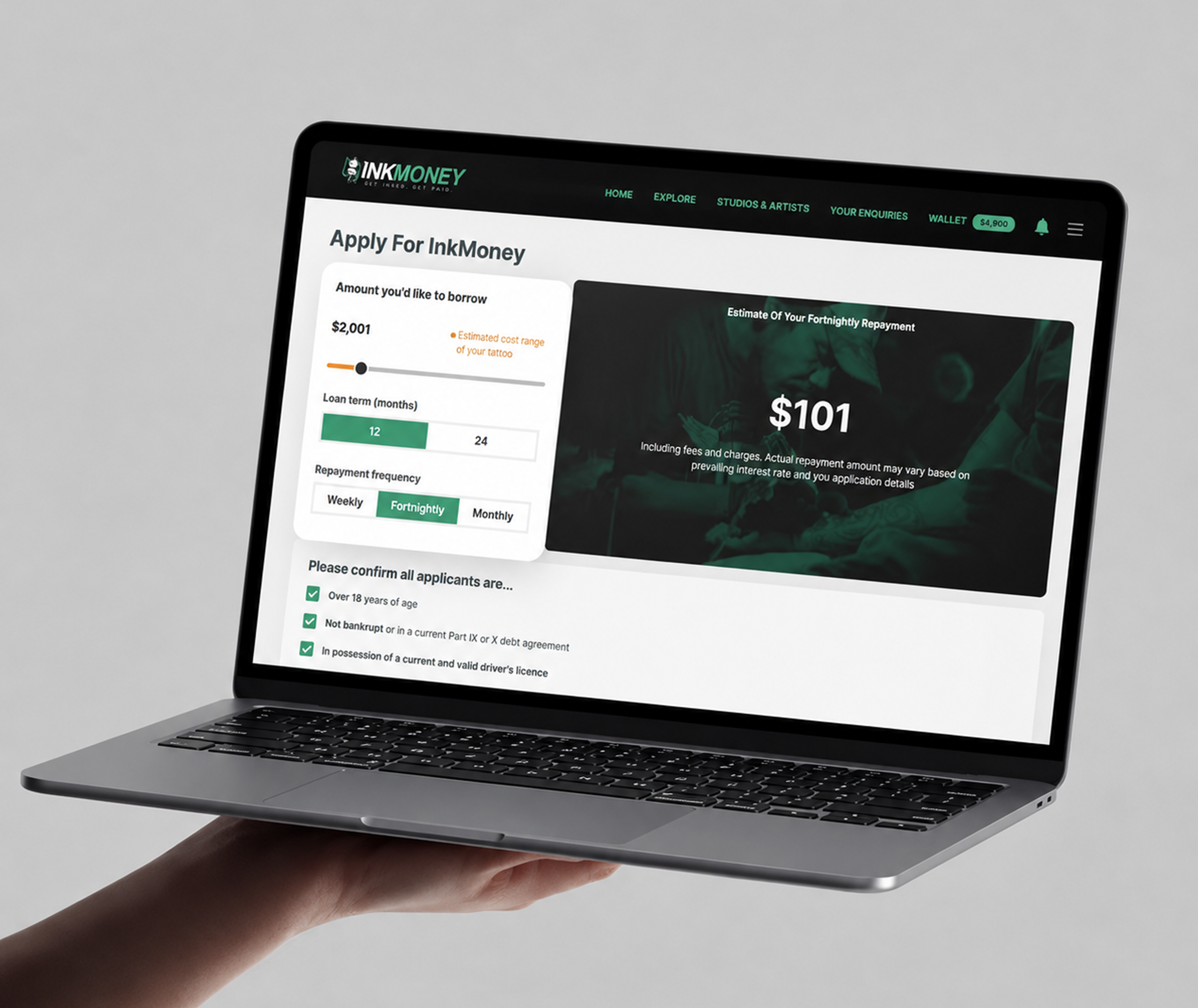
Users can apply for funds with this module. Users will select the fund amount, loan term, and repayment frequency. After accepting the terms and conditions user can enter their details like Name, email, Phone number, Business details, Income details, Expenses, etc, and apply for the Admin.

5. Inquiries
Users can make open inquiries or specific studio / Artist inquiries. An open inquiry is sent out to all studios/artists in the user's area, and users can choose the most appropriate studios for their tattoos. Also, If users already know what studio/artist they want to get tattooed by? The specific studio/artist button will take them to the search bar, where they can search for the studio/artist they are after. Once the inquiries are answered from the studio/artists' side a push notification will be coming to the user notification page with the updated status. If there are multiple inquiries answered received then the user can choose the preferred studio quotation for the tattoo and accept the final quotation for confirmation.

6. Explore
Users can explore the new studios or find new Art tattoo artists from the explore page. On the explore page users can find the tattoo art categories wise. Tattoo images are added by studios and Tattoo artists. So users will easily find the studio profile from the images and categories wise.

7. Studios
In this feature, users can discover their favorite artists and studios by searching functionality. Studios showing as per the membership plan like Platinum, and Gold. When users click on the particular studio then the studio profile and details page will be showing. Also on the details page, there will be Studio location, Notable styles, Opening hours, and an image gallery.

8. Apply Now
New users can apply for the funds from the apply now feature. Users need to enter their name, email address, and phone number to create a new account with inkmoney. After registration, they will be redirected to the application form 1st step and choose their fund amount, Loan terms, and repayment frequency then they will be redirected to the second step and fill in the required information in the application form.

9. Settings & Profile
Users can update their personal details from the edit profile also users will be able to update their email addresses with the update email field. Users can choose their profile pictures and update them.

10. Join (Studios/Artists)
Artists and studio owners can join this platform with the join module. They can add their Studio name, Email address, and Business number for registration.

11. Profile
On the profile page studio owners and Artists can update their Business number, Subscription type, Location, About us, Styles, Opening hours, and social media links.

12. Gallery
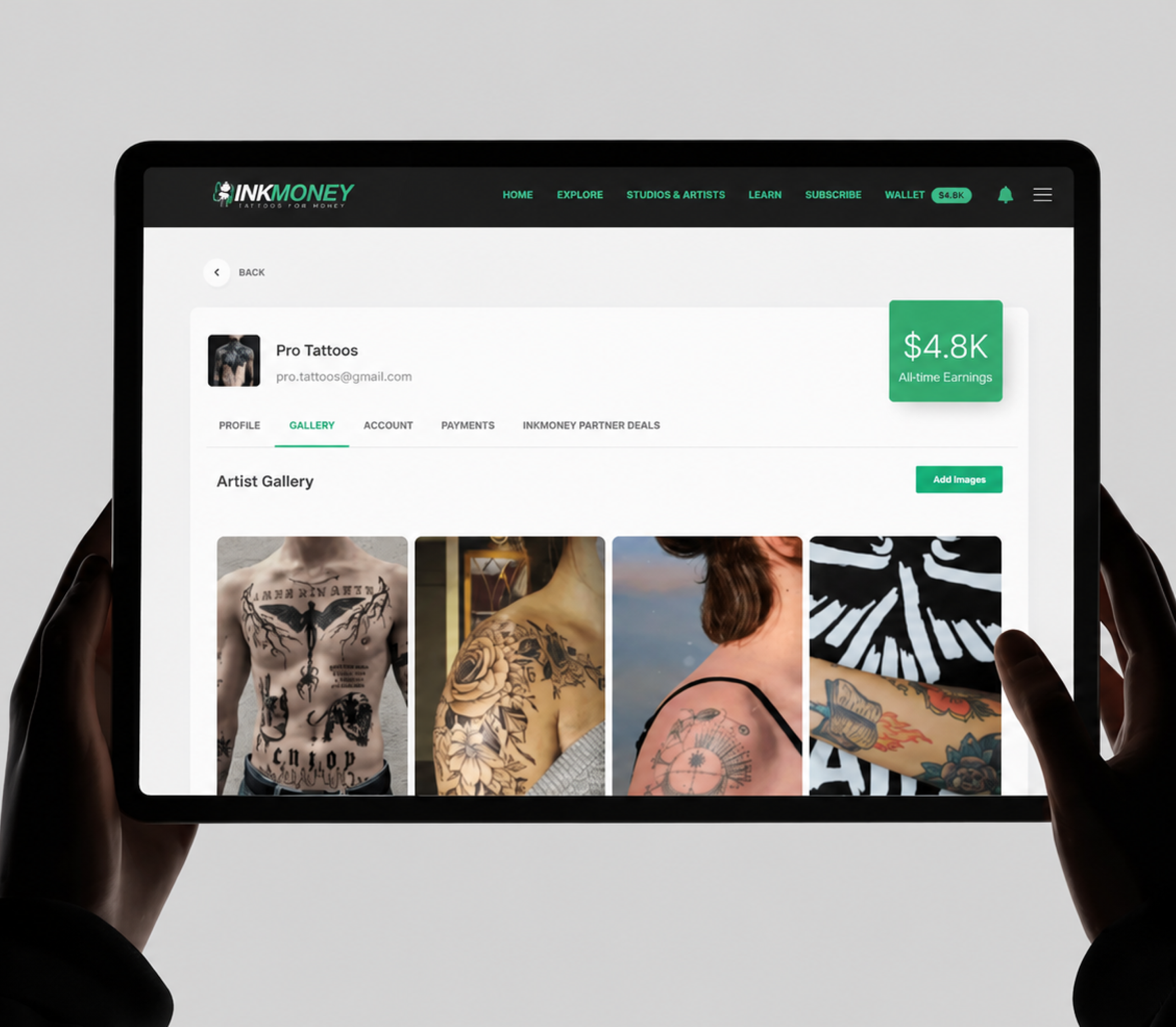
Studio owners can add, update and delete their added images from the gallery section. And those images will be shown from the studio profile gallery section.

13. Account
In this section studio owners can update their email addresses, also the inquiries-related settings are there. Owners can subscribe to their subscription plan and update it. Account status and invoice will be shown in this section.

14. Payments
Owners can update their bank details and also they able to see the transaction history in this section.

15. Withdraw Funds
Studio owners and artists can withdraw funds to their bank accounts by the withdrawal funds feature. Studio owners and Artists just need to enter the amount to withdraw and the description, and the BSB number and Account number will be automatically populated in the Account number field and BSB number field which they added in the previous payment section account details.

16. Leads
In this section, all the inquiries will be showing and studio owners/Artists can easily filter that with the status. In the inquiry details, it will be shown with the inquirer's name, Address, Tattoo body part, Tattoo style, Description, and estimated price also there will be Accept and Reject buttons for inquiry action. When studio owners/Artists will click on accept they need to add the Quote and note for inquiry confirmation. If they click on reject then the inquiry will be showing as rejected. The final quote will be accepted by the customer.

17. Dashboard
The admin can easily track the states for new users, studios, inquiries, pending applications, application amount, etc. Also, the Admin user can download the ABA file and can filter the data of the state.

18. Studios
This module is for studio listing in the console. Admin can invite new studios with their required details. Studio listing will be there with the studio's wallet balance, how many quotes were received by studios, and how many quotes responded to by studios. In studio details, the admin user can see the studio’s details like Name, Member Since, Descriptions, Notable styles, Opening hours, Social links, Gallery, and basic details.

19. Users
The users listing will be there with the basic information of the users that they added while registering with InkMoney. In the listing and details section, the admin can find the user’s details, Application sent count, user wallet balance, user inquiries, and user drawdown summary.

20. Application
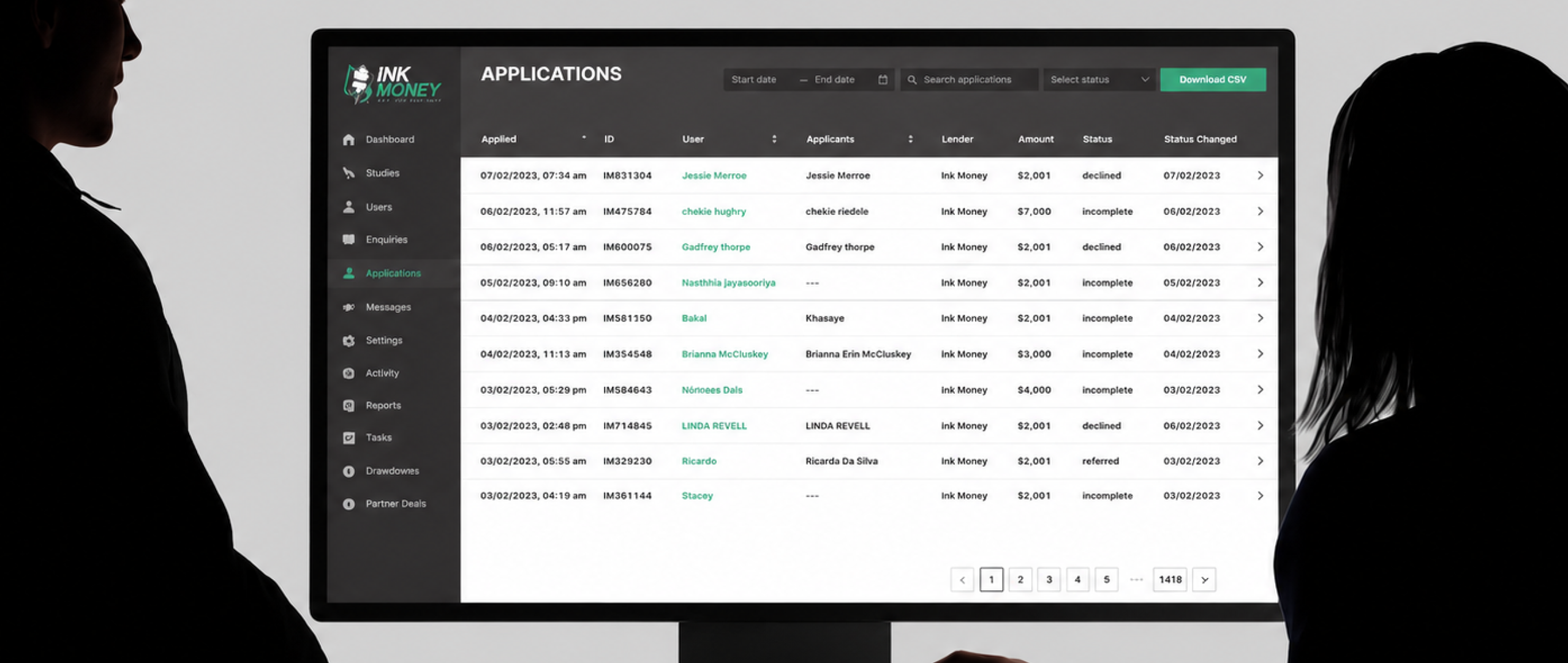
Application listing there which is made by a user with the Apply For More Funds module. In this application list, details about the Application applied date and time, ID, Applicant user, Lender, Amount, status, and Status change date. Admin users will check the application and submit it to the EasyLodge platform and then after the fund approval will receive it from the EasyLodge side. When a loan is approved, funds are credited to the applicant’s wallet.

21. Drawdown
A drawdown is the removal of funds from a user’s wallet, initiated by that same user. These funds may be sent directly to an InkMoney studio/artist (on-platform transfer) or may be transferred to the user’s bank account. A user’s wallet may contain funds from multiple loans, and a single drawdown may draw on funds from multiple loans. In these cases, it helps to consider a drawdown like this as multiple drawdowns each against a single loan.

22. Settings
Console Users:There is a listing of users who have console access. The console user can create a new console user and disable or deactivate it. Global Setting:In this feature, the console user can update the values for the Incomplete application follow-up task overdue time, Fund expiry follow-up task overdue time, minimum drawdown amount, and Loan application follow-up task overdue time.

Technology Stack
We leveraged a modern and scalable technology stack to build a secure, high-performing, and user-friendly platform. From cloud infrastructure and backend development to search capabilities and responsive UI frameworks, the chosen technologies ensured seamless performance, scalability, and an optimized user experience across devices.
Cloud Platform
AWS / Cloud Infrastructure
Data & Search
Database & Search Technologies
Backend Technology
Node.js
Frontend / UI Frameworks
UI Frameworks
Conclusion
InkMoney successfully transformed the tattoo marketplace by connecting users, studios, and artists on a single platform while simplifying tattoo financing and appointment workflows. With features like wallet management, loan applications, inquiry handling, studio discovery, and real-time communication, the platform created a seamless experience for both customers and tattoo professionals. By leveraging a scalable technology stack and user-centric approach, the solution ensured secure financial transactions, smooth marketplace interactions, and an intuitive experience across devices, making tattoo discovery and financing more accessible and efficient in Australia.
READY TO BUILD YOUR OWN ONLINE MARKETPLACE PLATFORM?
Create a scalable marketplace with secure payments, real-time communication, and seamless user experience.
More Projects